

-
Create a google ads account (Ongoing)
-
Create a capaign
Capaign Goal →
Website Traffic (To visit website)
Lead Generation (Offering demos and sign up)
Brand Awareness ( To exposure of the website)
We will choose Website Traffic
Campaign Type →
Search (Shows in google search result)
Display (Display in other website)
We will choose Search
Set Targeting →
Select Relevent Keyword
Location: Target audience based
Language: English
-
Create Ads
- Write a headline (30 characters max per line, up to 3 lines)
- Write short description (90 characters max per line, up to 2 lines)
- User url (https://docs.eagle3dstreaming.com/wiki/ )
-
Set a Budget & Bidding
bid is done for keyword
- It can be adjusted based on performance
- Set max cost per click(cpc) : $1
What Happens After You Create a Google Ads Campaign:
- Reviews based on ad text, keywords, and destination URL and ad policy
- ads will start appearing when people search for the keywords targeted ( 3D streaming Unreal Engine)
The position of ad depends on:
-
bid amount
-
ad quality score (how it measured need to check)
-
Relevance of landing page
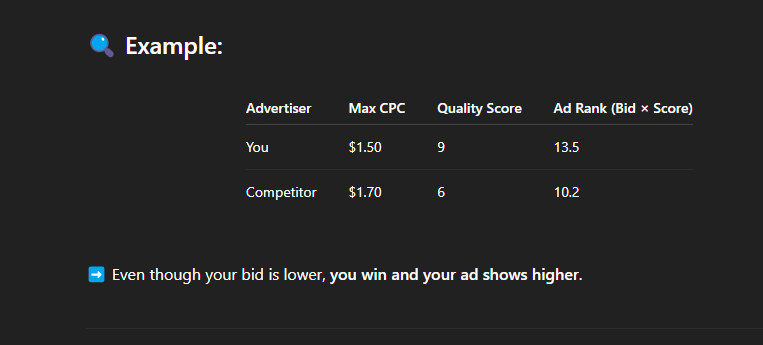
Google Ad Rank = Bid × Quality Score
Max CPC → max cost per click
Get Charged for Clicks
-
only pay when someone clicks ad.
-
daily budget limits how much can spend.
can do
-
Pause or edit your ad
-
Add or remove keywords