

The Eagle 3D Streaming (E3DS) platform utilizes a dual-storage architecture to manage application deployment and streaming across multiple streamer machines. This system is designed to balance performance, scalability, and availability.
There are two primary storage systems:
-
C Drive (Local Storage)
-
Shared Drive (Centralized Storage)
Storage Architecture
1. C Drive (Local Storage)
-
Each streamer machine has its own isolated C drive
-
Applications can be stored and executed locally on that machine
-
No synchronization between streamer machines
-
State persists only within that specific machine
2. Shared Drive (Centralized Storage)
-
A centralized storage system connected to multiple streamer machines
-
Applications uploaded by users are stored in the shared drive
-
Streamers connected to the shared drive access the same application data
-
State is shared across all connected machines
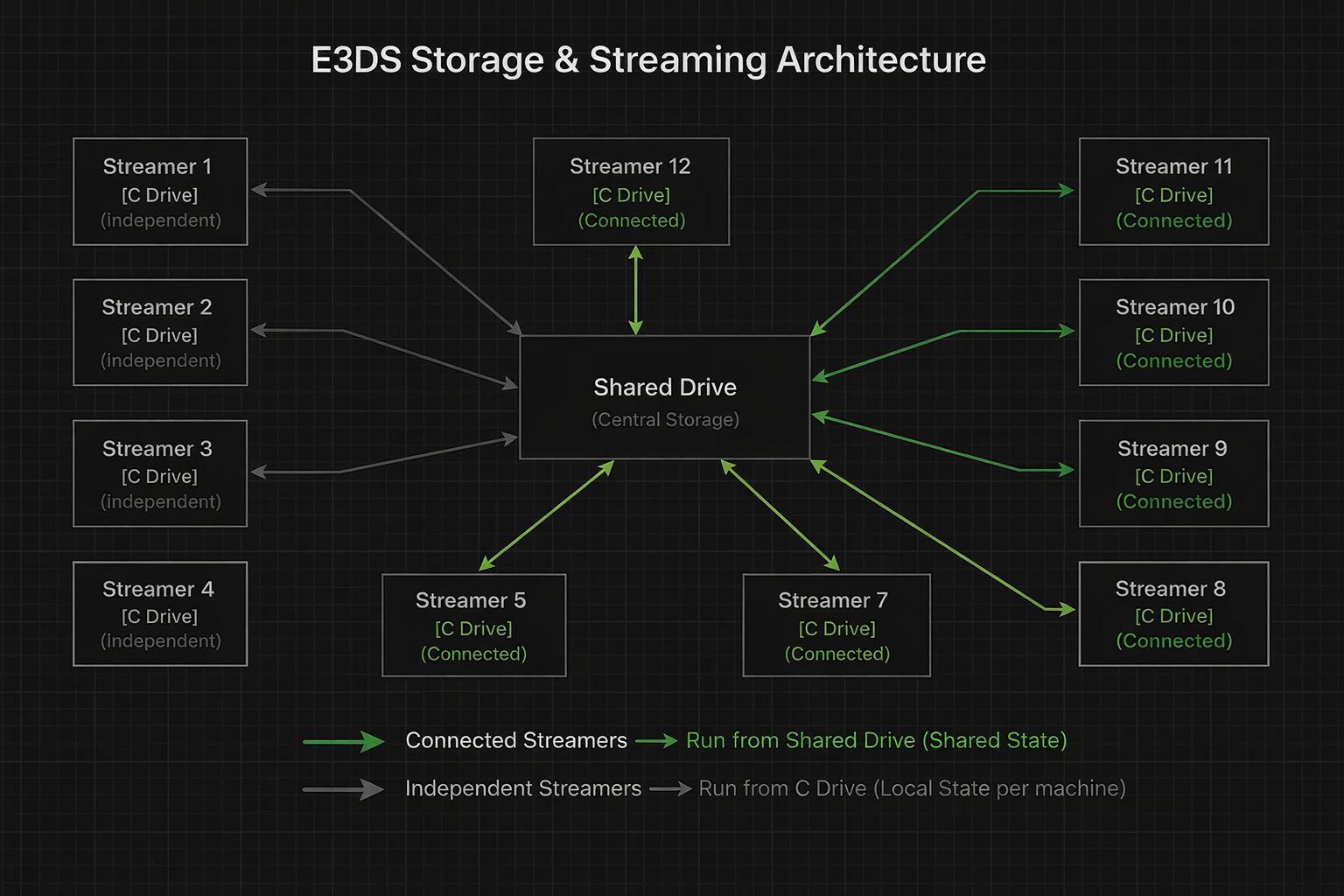
Application Upload Workflow
-
User uploads an application
-
The application is stored in the cloud
-
It is then placed into a shared drive
-
Streamer machines connected to the shared drive can directly stream the app
-
Streamer machines that not connected to the shared drive download the app in its C drive and then stream from C drive
Streaming Behavior
Case 1: Streamer Connected to Shared Drive
-
Application is streamed directly from the shared drive
-
All streamer machines share the same application state
Example
-
User A connects to Streamer 5 → sets language to Bengali
-
User B connects to Streamer 6 → sees Bengali
-
User B changes language to German
-
User C connects to Streamer 9 → sees German
State is shared across all connected machines
Case 2: Streamer NOT Connected to Shared Drive (C Drive Mode)
-
Application runs from the local C drive
-
Each machine maintains its own independent state
Example
-
User A connects to Streamer 1 → sets language to Arabic
-
User B connects to Streamer 1 → sees Arabic
-
User B changes to French
-
User C connects to Streamer 1 → sees French
BUT:
-
User D connects to Streamer 2 → sees default English
-
User E connects to Streamer 3 → sees default English
Each machine behaves independently
Key Differences
|
Feature |
C Drive |
Shared Drive |
|---|---|---|
|
Storage Type |
Local |
Centralized |
|
Data Sharing |
No |
Yes |
|
State Persistence |
Per Machine |
Global |
|
Isolation |
High |
Low |
|
Consistency |
Low |
High |
Limitations & Considerations (Important)
1. Data Persistence Across Users (Security Risk)
Problem
In both C drive and shared drive scenarios:
-
Data generated by one user (e.g., screenshots, saved files)
-
May be visible to the next user
Example
-
User A takes a sensitive screenshot
-
Stored in app directory or Documents
-
User B connects later
-
User B can access that screenshot
This creates a serious security and privacy concern
Recommended Solution
-
Implement dynamic per-session folder creation
Approach
-
On each session start:
-
Create a unique folder (e.g., timestamp/session ID)
-
Store user-generated files inside that folder
-
Example
Documents/
   Session_12345/
   Session_67890/
-
Each user gets isolated storage
-
Prevents cross-user data exposure
2. File Upload / Download Exposure
Problem
User files remain accessible to others.
Example
-
User A uploads a file
-
File is stored locally or shared drive
-
User B connects later
-
User B can access that file
Data leakage risk
3. Shared State Overwriting (Shared Drive Issue)
Problem
-
One user’s changes affect all users
Example
-
User A sets language → Bengali
-
User B → sees Bengali
-
User B changes → German
-
All future users → see German
No session isolation
Impact
-
Unpredictable user experience
-
Not suitable for personalized workflows
4. Inconsistent Behavior Across Machines (C Drive Issue)
Problem
-
Different machines behave differently
Example
-
Streamer 1 → Language = French
-
Streamer 2 → Language = English
Users get inconsistent experience depending on machine
5. Cold Start Delays
When Shared Drive is Not Connected
-
App must be downloaded to C drive if the app version is not available in C drive of that machine
-
Causes:
-
Long loading time
-
“Acquiring phase” delays
-
Need help?
🛠️ Contact our Support Team
💬 Join the Community on Discord
Follow us on: