

This guide explains how to download and install the E3DSFeatures plugin into your Unreal Engine project.
Video Demonstration
Step 1. Get the E3DSFeatures Plugin
-
Navigate to the plugin's GitHub repository:
https://github.com/e3ds-ue4/E3DSFeaturesPlugin/tree/Features -
Ensure you have switched to the Features branch.
-
Download the plugin files.
Step 2. Install the Plugin
-
In your Unreal Engine project's root directory, create a folder named
Pluginsif one does not already exist. -
Place the downloaded
E3DSFeaturesPlugin_Devfolder into your project'sPluginsfolder.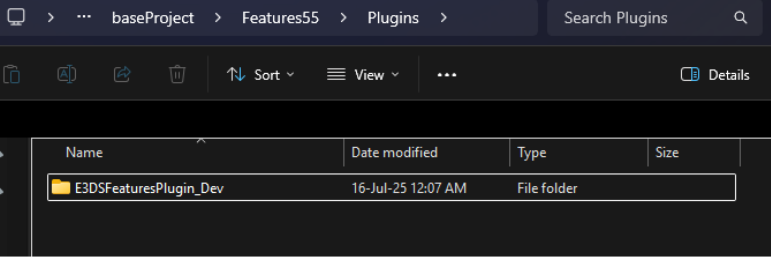
Figure 1. Downloaded Plugin
Step 3. Enable Required Plugins in Unreal Engine
-
Launch your Unreal Engine project.
-
From the main menu, navigate to Edit > Plugins.
-
In the Plugins window, search for and enable the E3DS Features Plugin.
-
Search for and enable the Pixel Streaming Plugin.
-
You will be prompted to restart the editor. Click Restart Now to apply the changes.
Need help?
🛠️ Contact our Support Team
💬 Join the Community on Discord
Follow us on:
Facebook | GitHub | LinkedIn | YouTube