

How to download and install the plugin
Plugin Download & Install
This section covers how to set up the Blueprint nodes to allow a user to upload a file. The file will be saved to a specific directory within your Unreal project's folder on the server.
Video Demonstration
Experience here:
https://connector.eagle3dstreaming.com/v5/e3ds_dev1/ue55cpp/default
Follow the guidelines below:
Part 1: Blueprint Logic for Uploading a File
-
Open the level you intend to stream.
-
Ensure an instance of the
E3DS_PS_actoris in your level.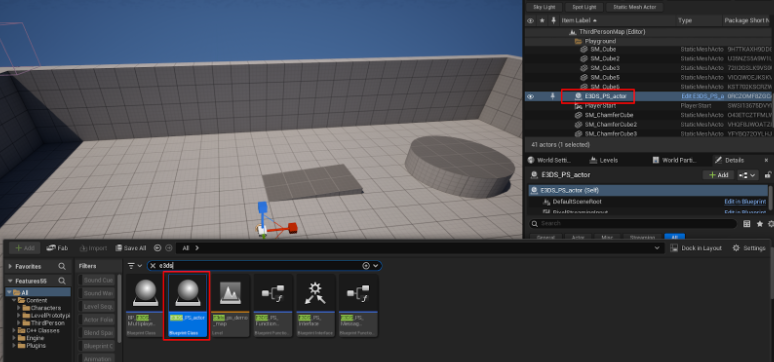
-
Open the Level Blueprint.
-
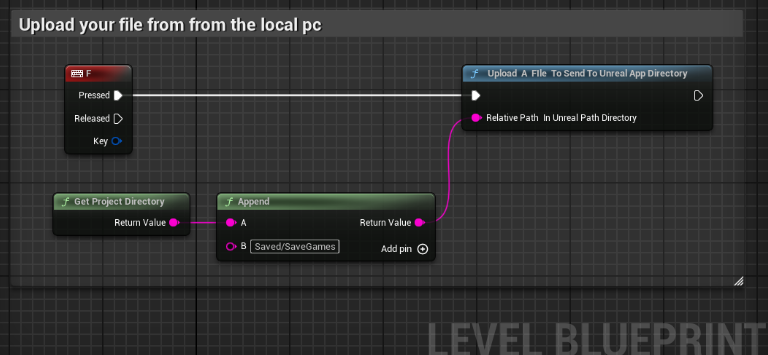
In the Event Graph, right-click and search for the Keyboard F event to add it to the graph.
-
Drag from the
Pressedexecution pin of the F key event and search for the Upload A File To Send To Unreal App Directory node. -
Right-click on the graph and add a Get Project Directory node.
-
Right-click again and add an Append string node.
-
Connect the
Return Valueof the Get Project Directory node to theApin of the Append node. -
In the
Bpin of the Append node, type the relative path where you want to save the file, for example,Saved/SaveGames. -
Connect the
Return Valueof the Append node to theRelative Path In Unreal Path Directoryinput pin of the Upload A File node. -
Connect the nodes as shown below.
-
Compile and Save the Blueprint.
Part 2: Verification
This section explains how to verify that the file upload functionality is working.
-
Connect to your remote editor session in your web browser. Click inside the editor viewport to ensure it has focus.
-
Press the F key on your keyboard.
-
Expected Result: A file selection dialog should open in your browser.
-
-
Select a file from your local computer and confirm the selection.
-
Expected Result: The file should be uploaded to the server and placed in the directory you specified in the Blueprint (e.g.,
<YourProjectPath>/Saved/SaveGames/). You can verify this by checking the file system of the remote machine.
-
This confirms that the Blueprint is successfully triggering the file dialog in the client's browser and handling the upload to the specified server directory.
How to test in remote editor streaming
Remote Control Unreal Editor
How to do blueprint debugging incase something in not working
Need help?
🛠️ Contact our Support Team
💬 Join the Community on Discord
Follow us on:
Facebook | GitHub | LinkedIn | YouTube